
 Attapon Thaphaengphan
หลายครั้งที่เราจะติดตั้งโปรแกมหรือธีมจากแหล่งต่างๆ ที่ไม่ได้ถูกบันทึกเอาไว้ที่ Cydia เราจำเป็นจะต้องทำ การเพิ่ม การเพิ่ม Source URL เข้าไปใน Cydia เสียก่อนจึงจะสามารถดาวน์โหลดโปรแกรมเหล่านั้นได้
ตัวอย่างเช่น เราจะดาวน์โหลดโปรแกรม Ultrasn0w มาใช้สำหรับการ Unlock iPhone ซึ่งเราทำการค้นหาจาก Cydia ในครั้งแรกจะไม่เจอ ดังนั้นเราจพต้องทำ การเพิ่ม Source URL เข้าไปใน Cydia ก่อน ดังนี้ครับ(วิธีการนี้ใช้ได้กับทุกๆ Source URL นะครับ)
ก่อนอื่น เราต้องหา Source URL มาให้ได้ก่อน ตัวอย่างจะเป็็น Source URL ของ Ultrasn0w คือ http://repo666.ultrasn0w.com วิธีการมีดังนี้ครับ
ขั้น 1 – เปิด Cydia ขึ้นมา
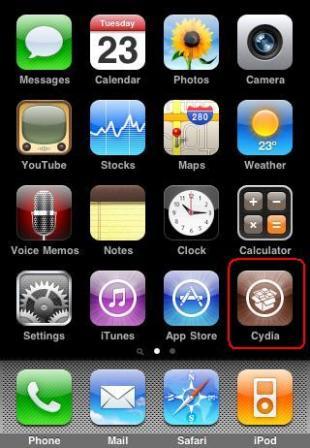
ขั้นที่ 2 – เมื่อเข้าหน้าโปรแกรมแล้วให้กด Manage (ด้านล่างตัวที่ 2 จากซ้าย)

ขั้นที่ 3 – กด Manage แ้ล้วจะเข้าหน้าต่อไปให้เลือก Source

ขั้นที่ 4 – กด Edit (มุมบนขวา) เพื่อเพิ่ม url ของโปรแกรมเข้าไป

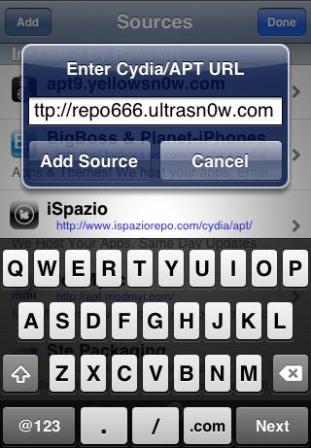
ขั้นที่ 5 – กด Add เพื่อจะเพิ่ม url ของโปรแกรม Ultrasn0w

ขั้นที่ 6 – เพิ่ม url : http://repo666.ultrasn0w.com เข้าไป แล้วกด Add Source (คำว่า ultrasn0w โปรดระวัง 0 คือ เลขศูนย์นะครับ ไม่ใช่ตัว o (โอ) )
ขั้นที่ 7 – จากนั้นโปรแกรมจะทำการ add source เมื่อเสร็จให้กด Return to Cydia

ขั้นที่ 8 – กด Done ที่มุมขวาบน เพื่อเสร็จสิ้นการ Add source
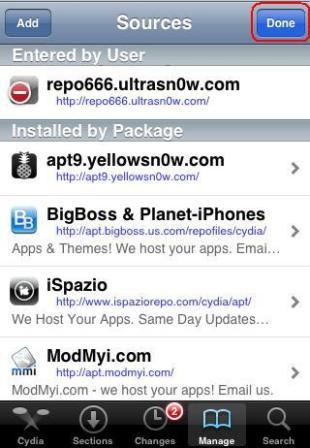
หลังจากนี้ Source URL ที่เราเพิ่มเข้ามานั้น เราก็สามารถเลือกติดตั้งโปรแกรมจาก Source เหล่านี้ได้ตามสบายครับ ซึ่งผมจะรวบรวม Source URL เอาไว้ให้อีกทีนะครับ
ขอบคุณรูปประกอบจาก photobucket.com

add url ที่ไหนค่ะ
โหลดจาก appstore นะ
หลังจากนี้ Source URL ที่เราเพิ่มเข้ามานั้น เราก็สามารถเลือกติดตั้งโปรแกรมจาก Source เหล่านี้
ติดตั้งยังไงครับ
เปิด cydia> manage> source เลือก url นั้นๆ แล้้วมันจะ list โปรแกรมออกมาให้
แล้วถ้าไม่มีcydiaหล่ะคะ เพราะเอาเครื่องไปลงโปรแกรมมาจากมาบุญครองหง่ะ มันก็เลยหายไป
แล้วตอนนี้ OS เป็นเวอร์ชันไหนคัรบ ดูที่
setting> general> about> version
ไม่มี Cydia เหมือนกันค่ะ กรณีเดียวกัน เป็นเครื่อง 3Gs จากทรู เวอร์ชั่น 3.1.2 ค่ะ
เครื่องเจลเบรคแล้วหรือยังครับ
เป็นเครื่องนอกนะตะเอง 3.1.3(7E18)
ทำตามแล้ว แต่พอ จะเสริตหา iblue กับไม่มีของอันนี้เลยค่า
ใช้ได้ดี เลย ครับ เย้ๆๆ จาก Australia
มี Source หลายอันได้มั้ยอ่ะคับ
ได้ครับ มีหลายอันก็ได้ครับ
เข้า cydia c]h; error คะ ไม่รู้ทามไง แบทหมดเร็วมากคะ 3 gs ios4.1
เจลเบรคด้วยอะไร
How to close " OpenSSH "
ถ้าเข้าไปแล้วหาแป้นไม่เจอหละครับ ช่วยทีพิมพ์ไม่ได้ToT
ลงเวอชั่นผิด เครื่องค้างทำไงได้บ้างครับ
โหลดCydiaได้ที่ไหนคะ
ต้องเจลเบรคครับ ค้นหาวิธีการเจลเบรคได้เลย
Write more, thats all I have to say. Literally, it seems as though you relied on the video to make your point. You definitely know what youre talking about, why waste your intelligence on just posting videos to your weblog when you could be giving us something informative to read?
you’re really a excellent webmaster. The website loading pace is incredible. It sort of feels that you’re doing any unique trick. Furthermore, The contents are masterwork. you have performed a fantastic job on this matter!
I’ll definitely bookmark this one – thank you!
Hello, this is a great blog!
Visiting London provides many choices to take into account. Almost all trips volition show you from the good reputation for Rome. Excursions are known to consider tourist approximately Paris , france for the duration of for 24 hours several hours respectively. Several guides give you grab as well as drop off for your lodge yet others volition fair select a person upward. Just how long it requires can vary depending on the tour and just how much time you could have. There are various alternatives available.
of course like your web-site however you need to take a look at the spelling on several of your posts. Many of them are rife with spelling issues and I find it very bothersome to tell the reality nevertheless I will surely come back again.
I don’t even know how I ended up here, but I thought this post was good. I don’t know who you are but certainly you’re going to a famous blogger if you are not already Oczko Cheers!
yes want