
 Attapon Thaphaengphan
จากเมื่อวานที่ผมได้เขียนเรื่อง iPhone แบตหมดเร็ว แก้ได้นะ แล้วในบทความนั้นได้เอ่ยถึงเรื่องการติดตั้งและการใช้งานโปรแกรม MemTool ซึ่งเป็นโปรแกรมที่เอาไว้ปิดโปรแกรมที่รันอยู่เบื้องหลัง(Run on Background) เพื่อที่จะทำให้ iPhone เราประหยัดพลังงานมากขึ้น เนื่องจากไม่ต้องสูญเสียไปให้โปรแกรมนั้นๆ ที่เราไม่ต้องการใช้ในตอนนั้นๆ
หรือถ้ามองอีกอย่างนึงก็คือการกู้คืนแรม (RAM) ที่มีอยู่น้อยนิดให้กลับมา อิอิ (iPhone 3G มี RAM = 128MB ส่วน iPhone 3GS มี RAM =256MB ส่วน 2G ไม่ทราบครับ ใครรู้ช่วยแชร์ด้วยนะครับ) โดยจะปิดโปรแกมได้ดังนี้คือ Mail, Safari และ iPod
วิธีการติดตั้งและใช้งานโปรแกรม MemTool
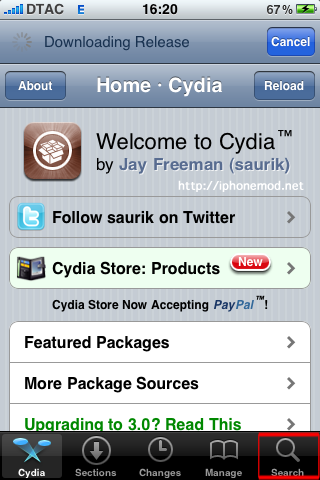
ขั้นที่ 1 เปิดโปรแกรม Cydia ขึ้นมาจากนั้นเลือก Search ที่มุมล่างขวา
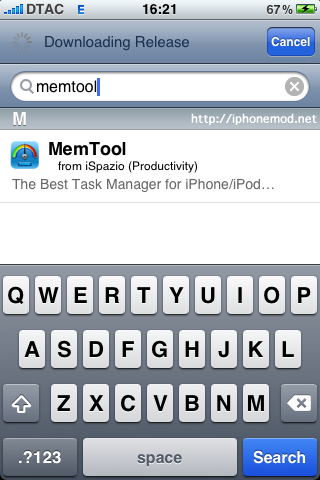
ขั้นที่ 2 ค้นหาด้วยคำว่า Memtool
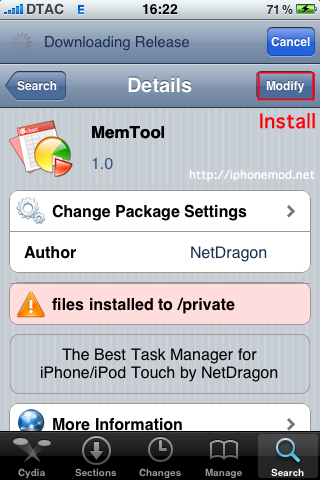
ขั้นที่ 3 เลือก Install ที่มุมบนขวา(เพราะผมลงไว้แล้วในรูปเลยขึ้นว่า Modify ครับ) แล้วกด Confirm เพื่อเริ่มการติดตั้ง เมื่อติดตั้งเสร็จให้กด Return to Cydia แล้วออกไปที่ Home ได้เลยครับ
ขั้นที่ 4 เปิดโปรแกรม MemTool ขึ้นมาครับ

ขั้นที่ 5 หน้าตาของโปรแกรม จากนั้นรอแป๊บนึงครับ
ขั้นที่ 6 กด Clean ครับ (จะเห็นว่าผมเปิด MobileMail เอาไว้ กินแรมไปตั้งแยะแหนะ 31.51MB) โปรแกมจะปิด MobileMail และโปรแกรมอื่นๆที่ไม่จำเป็นออกครับ
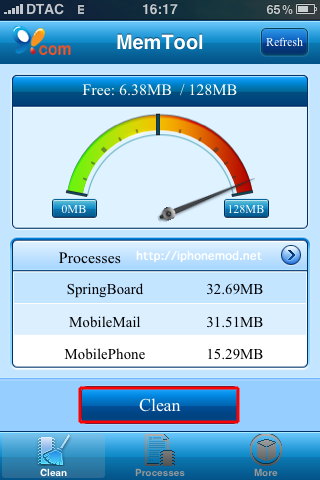
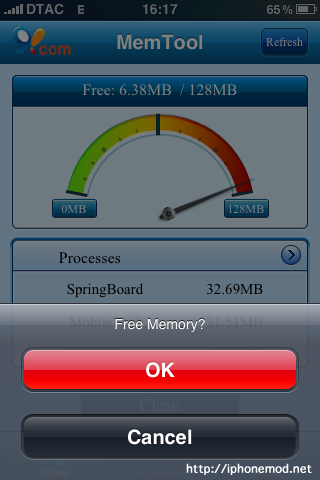
ขั้นที่ 7 กด OK เลยครับ
ขั้นที่ 8 จะเห็นว่าเราจะได้แรมคืนมา
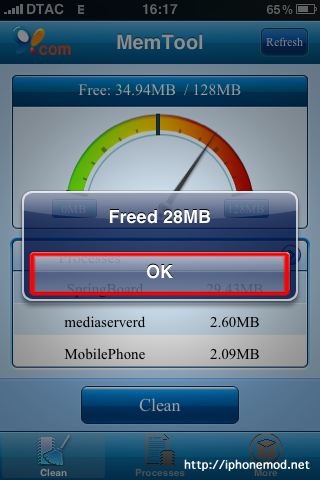
ขั้นที่ 9 จะเห็นว่าโปรมแกรม MobileMail ถูกปิดไปแล้ว

ขั้นที่ 10 เลือกที่ Process (ตรงกลางล่างครับ) เพื่อดูโปรเซสที่เหลือ ในกรณีที่ต้องการลบโปรเซสนั้นๆ
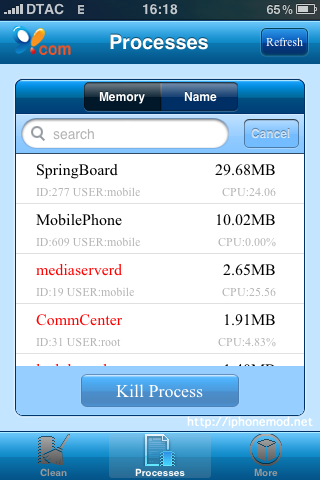
ขั้นที่ 11 ทดสอบปิด MobileSafari นั่นคือโปรแกรม Safari ครับ (กรณีตัวอย่างเช่น ผมเปิด iPod กับ Safari พร้อมกัน แต่ต้องการแค่จะปิด Safari อย่างเดียวก็เลือกปิดจาก Processes ครับ) ก็เลือกที่ MobilaSafari แล้วกด Kill Process
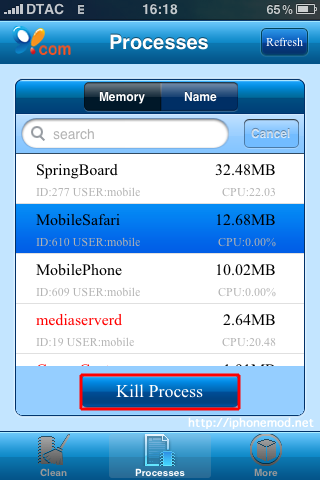
จากนั้นโปรแกรม Safari จะถูกปิดไป แต่ว่า iPod ยังอยู่ครับ
สรุปประโยชน์ของโปรแกรม MemTool ก็คือ ใช้ปิดโปรแกรมที่รันอยู่เบื้องหลัง ทำให้ iPhone เราประหยัดแบตเตอรี่มากยิ่งขึ้นครับ
หากท่านใดใช้ SBSetting ก็อาจจะได้เหมือนกันนะครับ ไงก็เอามาแชร์กันนะครับสำหรับท่านที่ใช้โปรแกม SBSettings

ผมกดเปิดโปรแกมแล้ ว มันเข้าไม่ได้อ่ะคับ
มันหลุดออกมาเอง
แนะนำ sbsetting แทนโปรแกรมนี้ก็ได้ครับ เดี๋ยวเย็นนี้ผมจะเขียนรีวิวให้ดูนะครับ
เปลี่ยนไปใช้ SBSettings แทนได้เลยครับ http://www.iphonemod.net/sbsettings.html
ทำไม 3GS ของเราโปรแกรมนี้เห็น RAM 128MB คะ
ลองดู sbsettings ครับ ผมเขียนเอาไว้แล้ว ลอง search ดูนะ
หาแล้ว ไม่เจออะค่ะ
Hi there just wanted to give you a quick heads up and let you know a few of the pictures aren’t loading correctly. I’m not sure why but I think its a linking issue. I’ve tried it in two different internet browsers and both show the same outcome.
ลงแล้ว แต่ใช้งานไม่ได้
Hi, this is a good post!
Wow, suprisingly I never knew this. Keep up with good topics.
I dicovered this is an benificial and interesting essay, so I think it is very helpful and knowledgeable. Many thanks for the efforts you have made in writing this submission. I am hoping the analogous good work from you next time as well. actually your creative writing ability has encouraged me.
I was just looking for this info for a while. After 6 hours of continuous Googleing, finally I got it in your site. I wonder what is the Google’s issue that doesn’t rank this kind of informative web sites closer to the top. Generally the top websites are full of garbage.
Hey This isnt to bad, i am browing your site now and wanted to say Thanks for taking your time to create this
whoah this blog is magnificent i love studying your articles. Keep up the great paintings! You understand, many people are searching round for this information, you can help them greatly.
Hello! I just would like to give a huge thumbs up for the great text you have here on this page. I will be coming back to your blog for more soon.
Great Article!