
 Attapon Thaphaengphan

OpenSSH คืออะไร หลายคนคงจะสงสัย ก่อนอื่นแนะนำให้อ่านบทวามนี้ก่อนนะครับ
OpenSSH เป็นการทำงานของระบบ โดยการทำงานอยู่เบื้องหลังด้วยความสามารถของ OpenSSH จะสามารถทำให้เราติดต่อกับไอโฟนได้ โดยผ่านทาง Wifi และทำให้สามารถโอนย้าย หรือขัดการไฟล์ระหว่างคอมฯกับไอโฟนได้ โดยหลังจากที่เราติดตั้ง OpenSSH แล้วจะไม่มีไอคอนแสดงให้เราเห็นนะครับ
มาดูวิธีการติดตั้ง OpenSSH กันครับ วิธีการจะติดตั้งผ่านทาง Cydia ครับ ไม่ยาก มาดูกันครับ
เปิด Cydia ขึ้นมาครับ จากนั้นเลือก OpenSSH Access How-To

จากนั้นเลือก OpenSSH
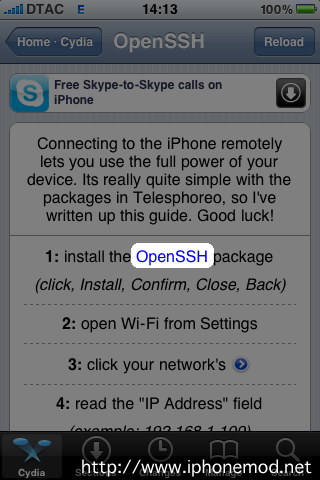
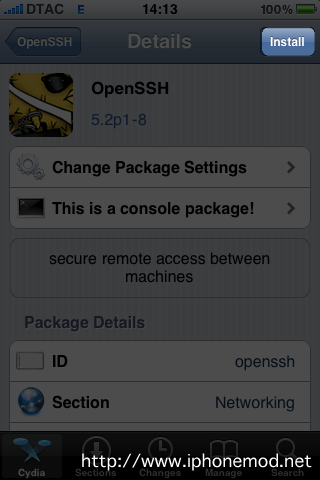
เลือก Install ครับ
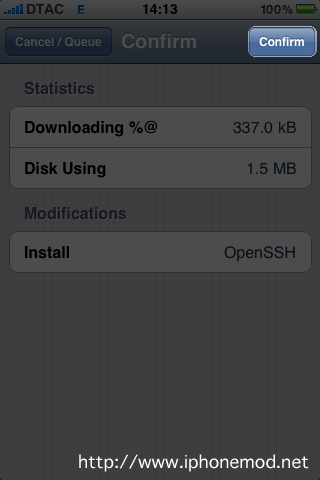
กด Confirm เพื่อเริ่มการติดตั้ง
ติดตั้งเสร็จให้กด Return to Cydia

ขั้นตอนการติดตั้ง OpenSSH ก็เสร็จเรียบร้อยแล้วนะครับ เดี๋ยวบทความต่อไปจะเสนอวิธีการจัดการไฟล์ระหว่างคอมพิวเตอร์กับไอโฟน มาให้ศึกษากันนะครับ
ความคิดเห็น - Like เพจ iPhoneMod.net

เอาไปเลยครับ เต็มสิบ
ขอบคุณมากค่ะ
useful ^^
รอ อยู่ครับ
เจ๋งมากครับ
^^*
ขอบคุณมากๆๆๆครับ
ทำใน ไอแพด2 ได้หรือป่าวอ่ะค่ะ
I am pleased to meet you
Good reading, might have more about this here. enjoy. It is good also to learn about Tibia and what it does to you. Thank you!
I simply needed to let you understand that your weblog doesn’t present up correctly on the BB browser, I added it to my bookmarks and have just checked from the desktop, nice format however a shame its not portable.
The Zune concentrates on being a Portable Media Player. Not a web browser. Not a game machine. Maybe in the future it’ll do even better in those areas, but for now it’s a fantastic way to organize and listen to your music and videos, and is without peer in that regard. The iPod’s strengths are its web browsing and apps. If those sound more compelling, perhaps it is your best choice.
Hello! I’m at work surfing around your blog from my new iphone 4! Just wanted to say I love reading your blog and look forward to all your posts! Carry on the great work!
ตอนนี้เข้า cydiaไม่ได้เลยโหลดโปรแกรมติดตั้ง OpenSSH ไม่ได้ทำไงค่ะ
เครื่องไม่ได้ jail เลยไม่มี cydia ทำไงดีอะคะ
เครื่องไม่ได้ jail ไม่มี cydia ทำไงดีอะคะ